-
Key Features
- Job-Based File Organization
- Automated extension-based sorting
- Supports Powerful File Actions including
- Move
- Rename
- Compress
- Extract
- Delete
- Copy
- Smart File Re-naming with Dynamic Patterns including
- original file name
- created date
- todays date
- file size
- customizable extension-based file path
- Automated Scheduling of Active Jobs
- Visual Preview of future file changes
- File change history page
- File change reversal
Discover UFO (Ultimate File Organizer), the best windows file organizer designed to bring order to your digital life. This powerful windows file organizer application automates tedious file management tasks, allowing you to create custom rules that sort, move, rename, and manage your files effortlessly. Whether you’re dealing with a chaotic downloads folder or an ever-growing collection of documents and photos, UFO provides the tools you need to maintain a perfectly organized system.
UFO empowers you with job-based file organization, providing unparalleled control over your digital files. Craft custom jobs by setting specific conditions that trigger automated actions. Target folders with precision, schedule jobs to run at your convenience, and preview the resulting file structure before committing to changes.
UFO offers an intuitive interface and a rich set of features. Imagine an app to organize windows files that intelligently filters by name, extension, size, dates, and even file content. Apply powerful actions like moving, copying, deleting, renaming with dynamic patterns (including dates, file types, and more), compressing, and extracting archives. With UFO, you can schedule these operations to run automatically – hourly, daily, weekly, or at specific times – even when the application isn’t open, thanks to its deep system integration.
Application Pages
- Jobs Table
- History
- File Type Mapping Customization
- Documentation
- Create / Edit Job Page
Jobs Table Page
Rule Overview: Easily manage active and inactive rules with a user-friendly interface.
Quick Actions: Enable, disable, or edit rules directly from the jobs table.
Status Insights: Check schedules, conditions, and progress at a glance for smooth operation.
-

Organized Rule Management with UFO’s Jobs Table
Manage and monitor your file organization rules with UFO File Organizer’s intuitive jobs table. View all active and inactive rules, their schedules, target folders, conditions, and actions in one place. Stay in control of your digital workspace by editing, enabling/disabling, and tracking rules effortlessly.
Edit and Create Rule Page
Define Rules: Set up detailed criteria to match and manage files precisely.
Schedule Tasks: Automate file management with flexible scheduling options.
Preview Mode: Visualize changes to files before activating rules for peace of mind.
-

Effortlessly Create and Edit File Management Rules
Customize your file organization with UFO File Organizer’s intuitive rule editor. Add target folders, set detailed conditions, schedule tasks, and define actions like move, copy, delete, compress, or rename files. Use smart patterns and preview changes before applying to ensure your files are sorted exactly how you want.
Preview Changes Page
Accurate Previews: Minimize mistakes by reviewing changes beforehand.
Dynamic Patterns: View how naming conventions and folder structures will be applied.
User Confidence: Gain clarity on file operations before activation.
-
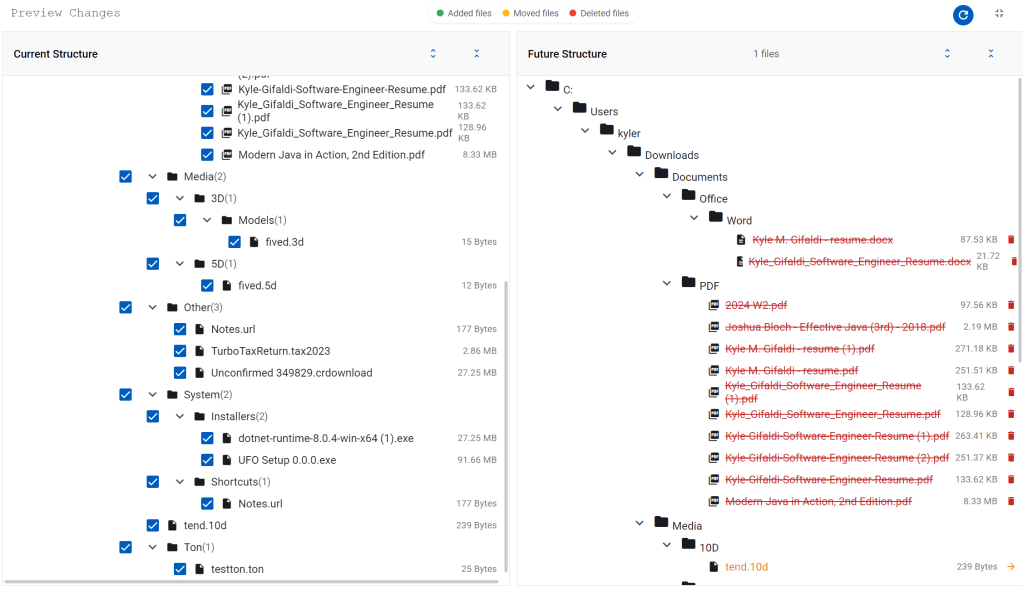
Visualize File Organization with Preview Mode
Preview the effects of your rules with UFO File Organizer’s built-in visualization feature. See exactly how files will be renamed, moved, or processed, ensuring accuracy and preventing errors. Stay in control of your file operations with this essential step.
File Type Mappings Page
Advanced Recognition: Sort files intelligently based on extension.
Customizable Mappings: Personalize file destination folder paths
-
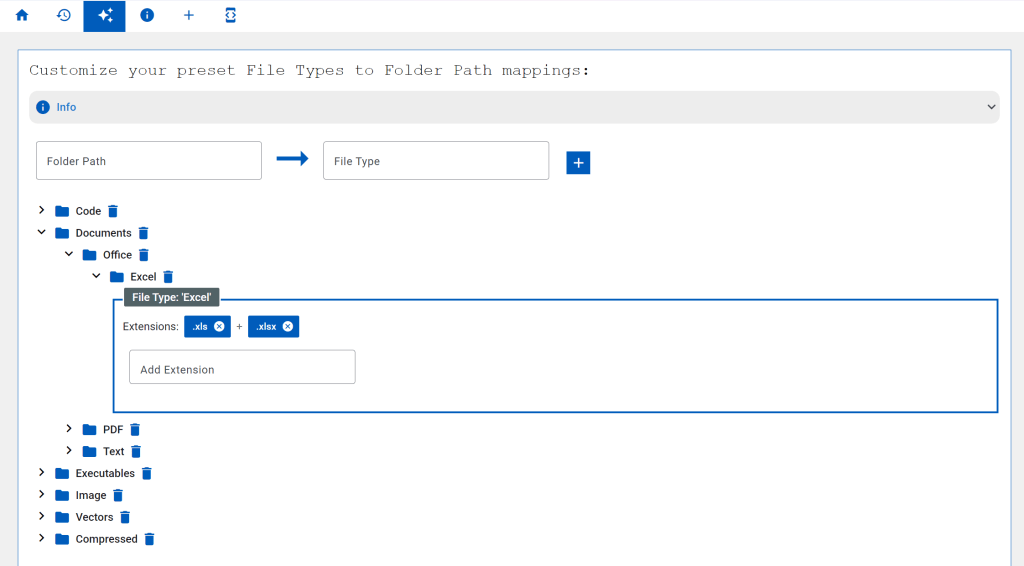
Smart File Categorization with UFO File Organizer
Take advantage of UFO’s intelligent file type recognition to classify files beyond simple extensions. Automatically identify and group files as Documents, Images, Videos, and more to streamline organization. Customize mappings for personalized categorization.
History Page
Detailed Logs: Access a complete history of file operations for insight and troubleshooting.
Transparency: Understand the status of every operation performed by UFO.
Improved Workflow: Optimize file organization processes with actionable data.
-
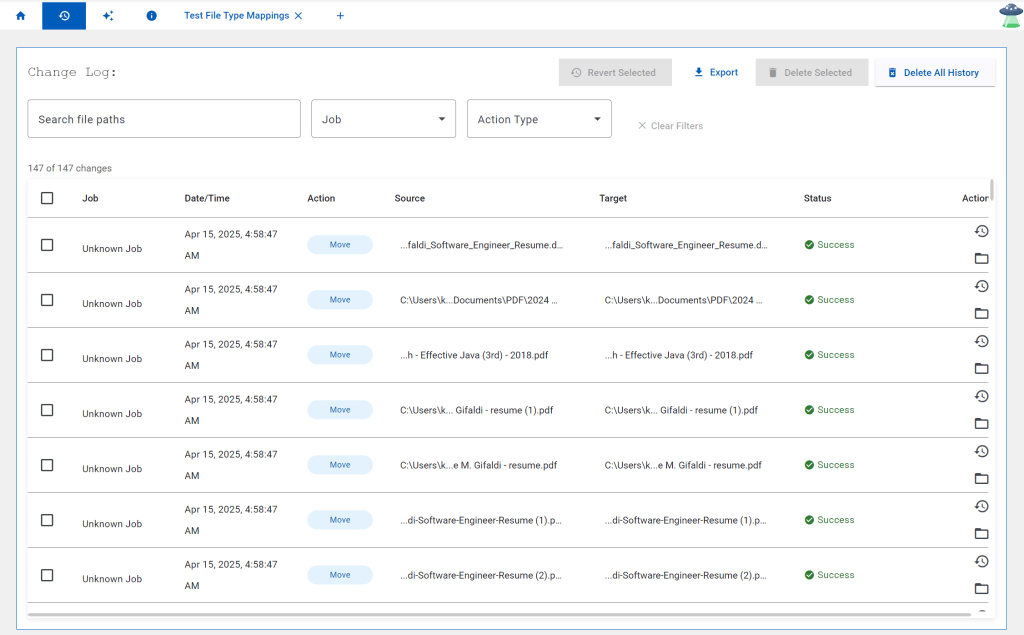
Track File Operations with UFO’s Comprehensive History
Maintain a record of all file operations with UFO’s detailed history logs. Review which files were processed, the actions applied, success or failure status, and timestamps. Easily troubleshoot issues with error messages and enjoy transparency in file management.
Documentation Page
Getting Started: Step-by-step instructions for setting up rules and automating tasks.
Advanced Features: Discover dynamic naming patterns, action chaining, and more.
Troubleshooting Tips: Solve common issues with clear guidance and actionable solutions.
-

Comprehensive User Guide for UFO File Organizer
Master file management with UFO File Organizer’s detailed user guide. Explore everything from rule creation to advanced dynamic patterns, scheduling, and troubleshooting. Learn best practices to optimize your workflow, and unlock the full potential of UFO’s powerful automation features.
- Checkout out our Documentation
- Download UFO
- Send us a message
Compare us to our competitors: